Page 2 of 5
Re: Bering Straight
Posted: Wed Jun 25, 2008 6:33 pm
by lanyards
pepperonibread wrote:Hey guys. So you all know, I let lanyards use borders I researched sometime last year. I think he didn't realize that they're all based on real borders. I still have to figure out what those territories were named, though, because I never wrote down their names. I think I've got the Russian half ready, that was pretty easy after Soviet Union. I may have to tweak the Alaska side a bit, but I'll PM lanyards when I've got all the names.
EDIT: Looks like lanyard's already fixed the Alaska side.
?The Alaska territories didn't weren't close to the borders I saw.
Re: Bering Straight (Update 1 - P.2)
Posted: Wed Jun 25, 2008 6:41 pm
by edbeard
I'm pretty sure the continents you have in Russia match the areas shown in the map I posted above.
I haven't seen any maps solely for those federation sections so I've no idea how the territory borders are.
70 territories will be a stretch to fit. There's a ton of water on the map he's pretty much at the size limits already.
I think what he's got is going to have to be it as on the small map, the spacing will be tougher to do.
I'm not sold on the North and South Alaska continents as I'm not totally sure where that border comes from and which Islands belong to which continent, and what those circles are in the straight.
It seems like the Alaskan continents take up a huge amount of territories. Each of the Russian takes up 6 territories (one might be seven). The Canada continent is 4.
That's a total of 23 which leaves 19 for the two Canada continents. Do we want two large continent right next to each other? Would it be better to split that into three continents? Maybe (using one of my maps above), split up Alaska into
1) Barrow + Fairbanks for a large continent.
2) Bethel plus islands
3) Anchorage and Juneau
just an idea.
Re: Bering Straight (Update 1 - P.2)
Posted: Thu Jun 26, 2008 1:19 pm
by lanyards
Is this good for marking continents?
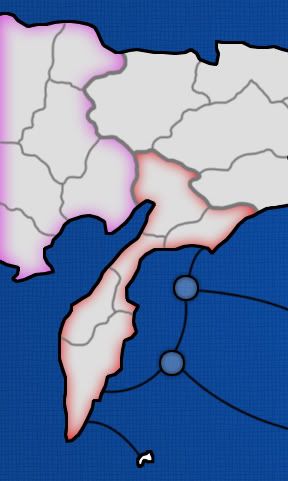
--lanyards
Re: Bering Straight (Update 1 - P.2)
Posted: Thu Jun 26, 2008 1:24 pm
by AndyDufresne
I've never been a big fan of the above style of marking continents...full colors always will hold a spot in my heart.

--Andy
Re: Bering Straight (Update 1 - P.2)
Posted: Thu Jun 26, 2008 1:25 pm
by lanyards
AndyDufresne wrote:I've never been a big fan of the above style of marking continents...full colors always will hold a spot in my heart.
--Andy
How about very light colors with it darkened around the edges?
--lanyards
Re: Bering Straight (Update 1 - P.2)
Posted: Thu Jun 26, 2008 1:27 pm
by AndyDufresne
Perhaps...depends on how light!
--Andy
Re: Bering Straight (Update 1 - P.2)
Posted: Thu Jun 26, 2008 3:22 pm
by ZeakCytho
I kind of like the ones you posted. I'd do all of Russia in one set of colors (reds, probably?) and all of Alaska in a different set (blues?), but keep them all very cool - nothing hot or exciting for the Bering Strait (It's strait, not straight, btw).
Re: Bering Straight (Update 1 - P.2)
Posted: Thu Jun 26, 2008 3:26 pm
by lanyards
ZeakCytho wrote:I kind of like the ones you posted. I'd do all of Russia in one set of colors (reds, probably?) and all of Alaska in a different set (blues?), but keep them all very cool - nothing hot or exciting for the Bering Strait (It's strait, not straight, btw).
What about the individual continents inside Alaska and Russia?
--lanyards
Re: Bering Straight (Update 1 - P.2)
Posted: Thu Jun 26, 2008 10:38 pm
by mibi
I like it. Though I think there should be more bottle necks.
Re: Bering Straight (Update 1 - P.2)
Posted: Fri Jun 27, 2008 12:30 am
by lanyards
Update 2, added names so font can be commented on, fixed some Canadian borders, and changed the graphics.
[bigimg]http://i282.photobucket.com/albums/kk273/lanyards/BeringStraightMapLayeredV7.jpg[/bigimg]
Comments on gameplay and graphics?
--lanyards
Re: Bering Straight (Update 2 - P.3)
Posted: Fri Jun 27, 2008 7:21 am
by RjBeals
do i count 43 or 42 territs?
The graphics look good so far, but there's not much to comment on yet. The layout looks good. As long as you make alaska feel like alaska, and russia feel like russia

Re: Bering Straight (Update 2 - P.3)
Posted: Fri Jun 27, 2008 5:08 pm
by Herakilla
i like the map but personally i dont like how much of a bottleneck it is between russia and alaska (only 3 territs). i didnt really read much of the comments, just skimmed so if its been disscussed ignore me lol. the thing is if one player were to get ahold on all of one side he/she can easily defend it. you could easily solve this with ports or something
Re: Bering Straight (Update 2 - P.3)
Posted: Fri Jun 27, 2008 5:37 pm
by InkL0sed
I agree there's a little bit too much of a bottleneck between Alaska and Russia. I think that island off the north coast of Russia could be connected to an Alaskan territory. After all, they're actually much closer that far north than they look.
Re: Bering Straight (Update 2 - P.3)
Posted: Fri Jun 27, 2008 7:07 pm
by Mr. Squirrel
At first glance, the map looks great. My family actually lives in alaska so I'm glad to finally see a map made of the area. I see a few people are complaining about a bottleneck between the two continents. The way I see it, if one person owns all of one side to themself, they pretty much have the game won, bottleneck or no. The only scenario where this would not be the case is if one person owns the complete other side, in which then they would also benifit from the bottleneck, so it all works out in the end.
I am against the addition of ports simply because of the region of the map. Annual ice flows through the Bering Straight halt a lot of ocean traffic. Really, fishing ships are the only ships stupid enough to go sailing frequently those waters. If there was ever a war up there, no smart general would sail an army across those waters. He would lose many men in the crossing, and when he finally landed, they would be freezing and exhausted from the voyage. What you have right now is fine, but don't add any ports.
Re: Bering Straight (Update 2 - P.3)
Posted: Fri Jun 27, 2008 8:04 pm
by lanyards
Mr. Squirrel wrote:At first glance, the map looks great. My family actually lives in alaska so I'm glad to finally see a map made of the area. I see a few people are complaining about a bottleneck between the two continents. The way I see it, if one person owns all of one side to themself, they pretty much have the game won, bottleneck or no. The only scenario where this would not be the case is if one person owns the complete other side, in which then they would also benifit from the bottleneck, so it all works out in the end.
I am against the addition of ports simply because of the region of the map. Annual ice flows through the Bering Straight halt a lot of ocean traffic. Really, fishing ships are the only ships stupid enough to go sailing frequently those waters. If there was ever a war up there, no smart general would sail an army across those waters. He would lose many men in the crossing, and when he finally landed, they would be freezing and exhausted from the voyage. What you have right now is fine, but don't add any ports.
Yeah, that is what I was thinking. By the time you hold the whole half side of the map, you've pretty much won. And I don't like the idea of ports either, mabye an extra couple of islands, but no ports. But thanks for the suggestions Hera, Rj, and Ink. And I think I do have 43 territs, I'll have to fix that.
--lanyards
Re: Bering Straight (Update 1 - P.2)
Posted: Fri Jun 27, 2008 9:54 pm
by ZeakCytho
lanyards wrote:ZeakCytho wrote:I kind of like the ones you posted. I'd do all of Russia in one set of colors (reds, probably?) and all of Alaska in a different set (blues?), but keep them all very cool - nothing hot or exciting for the Bering Strait (It's strait, not straight, btw).
What about the individual continents inside Alaska and Russia?
--lanyards
Different shades of the Alaska and Russia colors (blue and red?). Assuming Russia is red, one Russian continent can be one shade of red, another a bit darker, and another a bit lighter. See Gimil's Era of Three Kingdoms Map for sort of what I mean, though colors that strong would not work here.
Re: Bering Straight (Update 1 - P.2)
Posted: Fri Jun 27, 2008 10:18 pm
by lanyards
ZeakCytho wrote:lanyards wrote:ZeakCytho wrote:I kind of like the ones you posted. I'd do all of Russia in one set of colors (reds, probably?) and all of Alaska in a different set (blues?), but keep them all very cool - nothing hot or exciting for the Bering Strait (It's strait, not straight, btw).
What about the individual continents inside Alaska and Russia?
--lanyards
Different shades of the Alaska and Russia colors (blue and red?). Assuming Russia is red, one Russian continent can be one shade of red, another a bit darker, and another a bit lighter. See Gimil's Era of Three Kingdoms Map for sort of what I mean, though colors that strong would not work here.
Something like this is probably the best way to show continents, I'll see how it looks. But if all the colors are really light, wouldn't it make all the shades look the same?
--lanyards
Re: Bering Straight (Update 1 - P.2)
Posted: Fri Jun 27, 2008 10:31 pm
by ZeakCytho
lanyards wrote:ZeakCytho wrote:Different shades of the Alaska and Russia colors (blue and red?). Assuming Russia is red, one Russian continent can be one shade of red, another a bit darker, and another a bit lighter. See Gimil's Era of Three Kingdoms Map for sort of what I mean, though colors that strong would not work here.
Something like this is probably the best way to show continents, I'll see how it looks. But if all the colors are really light, wouldn't it make all the shades look the same?
--lanyards
I guess you should try it out and see. I think there's a way to make it work.
Re: Bering Straight (Update 2 - P.3)
Posted: Sat Jun 28, 2008 1:34 pm
by lanyards
Update 3, finished off naming all the territories.
[bigimg]http://i282.photobucket.com/albums/kk273/lanyards/BeringStraightMapFlatV8.jpg[/bigimg]
Font look good?
--lanyards
Re: Bering Straight (Update 3 - P.3)
Posted: Sat Jun 28, 2008 3:15 pm
by seamusk
The map looks good. I'm not crazy about the font. You have 3 points of contact between east and west and I think that is good. You wouldn't want more or it wouldn't really seem so much like the Bering Straight.

Re: Bering Strait (V3 - P.3)
Posted: Sat Jun 28, 2008 11:18 pm
by lanyards
Version 4:
[bigimg]http://i282.photobucket.com/albums/kk273/lanyards/BeringStraightMapFlatV9.jpg[/bigimg]
In this update, I added colors to the continents, and added a legend and bonuses.
--lanyards
Re: Bering Strait (V4 - P.4)
Posted: Sat Jun 28, 2008 11:24 pm
by wcaclimbing
The colors are too similar, in my opinion. Its got the icy feel, but its tough to tell which continent is which, because all the colors are almost the same blue.
Re: Bering Strait (V4 - P.4)
Posted: Sat Jun 28, 2008 11:36 pm
by Joodoo
Yukon is part of Canada, not USA.
Maybe you should make it North American Continents instead of American continents to make it more geographically correct.
Re: Bering Strait (V4 - P.4)
Posted: Sat Jun 28, 2008 11:36 pm
by Incandenza
I like the various blues, but perhaps a minimap would alleviate any problems.
One recommendation: if you or the foundry isn't wild about having Kamchatka as both a terit and a continent name, you could rename the terit "Petropavlovsk", the shortened name of the major city within the region denoted by the "Kamchatka" terit
Re: Bering Strait (V4 - P.4)
Posted: Sat Jun 28, 2008 11:42 pm
by lanyards
Incandenza wrote:I like the various blues, but perhaps a minimap would alleviate any problems.
One recommendation: if you or the foundry isn't wild about having Kamchatka as both a terit and a continent name, you could rename the terit "Petropavlovsk", the shortened name of the major city within the region denoted by the "Kamchatka" terit
I tried a mini-map, but it didn't look good and the continent names wouldn't fit. But I don't like the Kamchatka thing either, and I'd rather change the name of the continent than the territ, but I will if I have to.
--lanyards