Help
Play States
Play By Clickable Map
Deploy: Click on territory to deploy, choose number to deploy and click again to make deployment
Assault: Click on a territory to Assault from, then on a territory to Assault (right click to Auto Assault)
Advance: Click on conquered territory to choose to advance, choose number to advance, then click again to advance. Click on conquering territory to advance zero.
Reinforce: Click on a territory to Reinforce from, then on a territory to Reinforce to. Click again to confirm.
Play By Keyboard and Mouse
N Key: Skip to next game, Jump to next game
B Key: Begin Turn
E Key: End Deployment, End Assaults, End Reinforcement
L Key: Later (decline to play spoils)
W,S Keys: Increase/decrease troop quantity (slow)
Q,A Keys: Increase/decrease troop quantity (fast)
Mouse Wheel: Change troop quantity by scrolling over the selected region.
CTRL Key + Click: You can always use CTRL-click instead of the right mouse button.
Middle Click: To advance to next stage (Begin Turn, End Assaults, etc.) click the middle mouse button anywhere on the map.
2009-03-03 17:29:57 - lozzini: gl all
2009-03-04 13:25:29 - falcon85: gla
2009-03-09 16:07:46 - lozzini: soz about the turn
2009-03-16 22:21:58 - falcon85: sorry topper - didn't really want to eliminate that many of yor territories
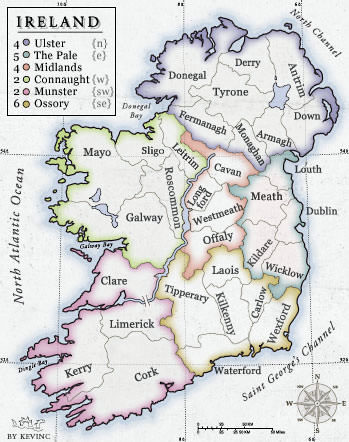
2009-03-16 22:23:22 - falcon85: however, yellow seems to have something against trying to break your bonus even though he could easily do it from Cork
2009-03-17 15:22:27 - topper: no worries , this game has been yours for a while ,
2009-03-17 15:24:08 - falcon85: i don't know about that - you seem to keep getting good dice to bring me down
2009-03-17 22:13:44 - topper: haven t you won yet ! gg
2009-03-17 22:22:47 - lozzini: yer red this has been ages coming
2009-03-18 07:51:46 - topper: gg
2009-03-18 17:00:01 - falcon85: gg - sorry if I took too long - ;-)